
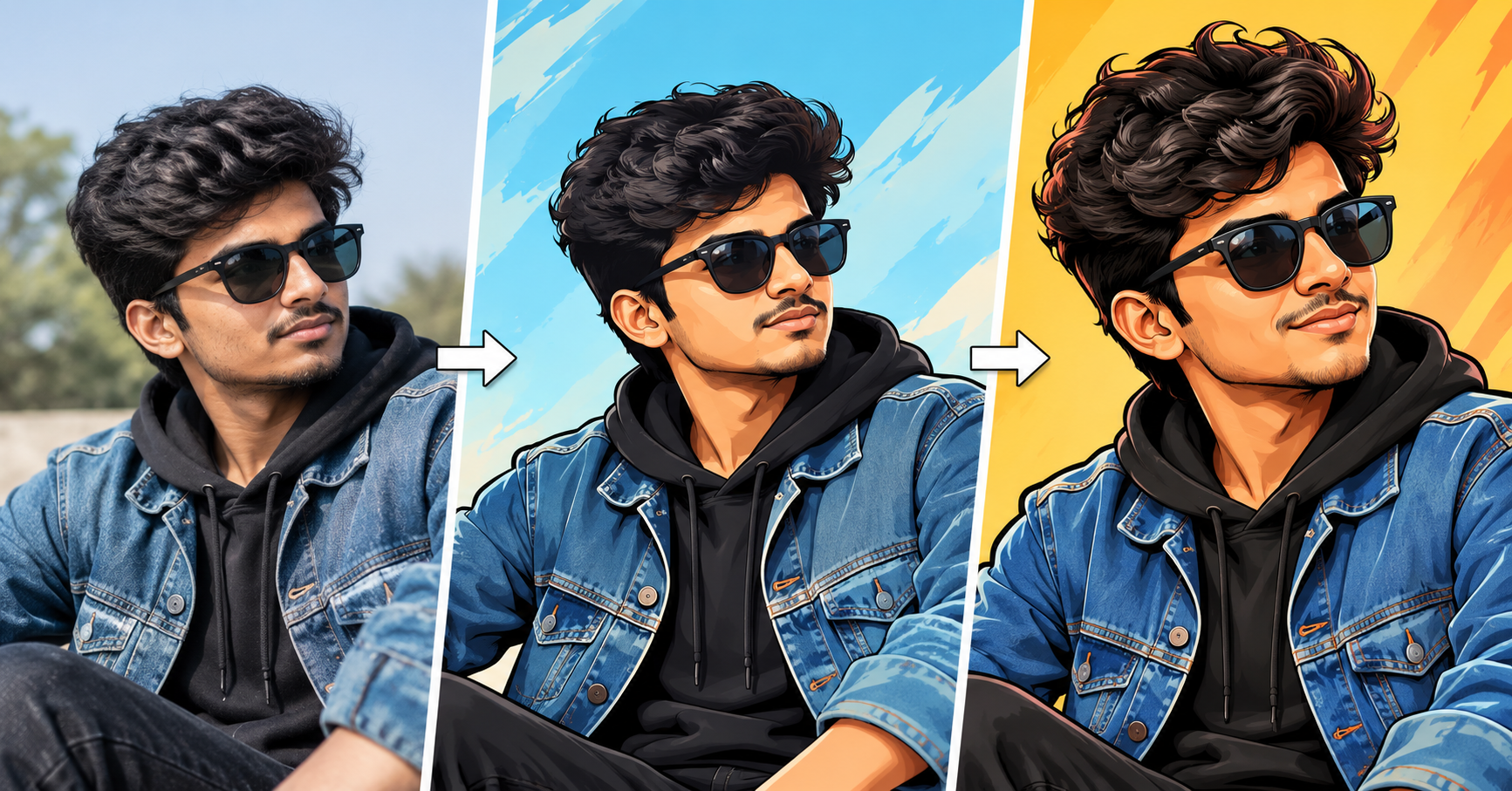

Turning an ordinary photo into a cartoon or caricature has become one of the most popular creative uses of AI image tools. Whether you’re personalizing a profile picture, creating a fun gift, or building content for social media, the right prompt makes all the difference between a flat, generic result and an image that actually feels alive. Below is a practical guide to crafting prompts that consistently produce sharp, expressive cartoon and caricature transformations.
Why Prompt Wording Matters So Much
AI image generators and photo-to-art converters respond to specific language. Vague instructions like “make this a cartoon” often produce inconsistent results because the model has too many interpretations to choose from. The more precisely you describe the art style, proportions, color palette, and mood you want, the closer the output will match your vision. Think of your prompt as a creative brief, not just a request.
Core Elements Every Good Prompt Should Include
Before jumping into examples, it helps to understand the building blocks of an effective prompt:
1. Art style reference — Specify whether you want a classic cartoon look, anime-inspired art, Pixar-style 3D rendering, comic book shading, or a hand-drawn caricature with exaggerated features.
2. Level of exaggeration — Caricatures rely on emphasizing distinct facial features (like a wide smile, prominent nose, or expressive eyes). Cartoons, on the other hand, usually simplify features rather than exaggerate them. State clearly which effect you’re after.
3. Color and shading style — Flat colors, cel-shading, watercolor textures, or bold outlines each create a completely different mood.
4. Background treatment — Decide if you want a plain background, a themed scene, or something that complements the subject’s personality or profession.
5. Preserving likeness — If you want the cartoon to still resemble the original photo, say so explicitly. Otherwise, some tools will stylize so heavily that the resemblance is lost.
Sample Prompts for Cartoon Conversion
Here are several ready-to-use prompt templates you can adapt:
- “Convert this photo into a 2D cartoon illustration with clean bold outlines, flat pastel colors, and simplified facial features, while keeping the person’s likeness recognizable.”
- “Transform this image into a Disney/Pixar-style 3D cartoon character with soft lighting, large expressive eyes, and a friendly, approachable expression.”
- “Turn this photo into a comic book style illustration with strong black outlines, halftone shading, and vibrant primary colors, similar to a superhero comic panel.”
- “Create an anime-style version of this photo with stylized hair, simplified facial structure, and soft cel-shaded lighting.”
- “Redraw this photo as a minimalist vector cartoon avatar with solid color blocks and no gradients, suitable for a social media profile picture.”
Sample Prompts for Caricature Conversion
Caricatures require language that pushes the model toward playful exaggeration rather than simplification:
- “Create a caricature of this person exaggerating their smile, eyes, and hairstyle in a humorous but flattering way, with a hand-drawn ink and watercolor style.”
- “Generate a caricature illustration with an oversized head and small body, emphasizing the subject’s distinctive facial features, drawn in a classic newspaper caricature style.”
- “Turn this photo into a fun caricature with exaggerated proportions, bright colors, and a playful cartoon background related to [hobby or profession].”
- “Draw a digital caricature portrait emphasizing expressive eyebrows and a big grin, styled like a theme park artist sketch.”
Tips for Getting Better Results
Be specific about proportions. Words like “slightly exaggerated,” “moderately exaggerated,” or “heavily exaggerated” give the model a clearer target than simply saying “caricature style.”
Reference known art styles carefully. Naming a specific studio or artist’s copyrighted style may not always be replicable depending on the platform’s policies, but describing techniques (thick outlines, cel-shading, soft gradients) works reliably across tools.
Mention clothing and accessories. If you want glasses, hats, or specific outfits preserved or stylized, include that detail directly in the prompt.
Iterate in small steps. If the first output isn’t quite right, adjust one variable at a time — for example, change only the exaggeration level or only the color palette — rather than rewriting the entire prompt.
Specify image orientation and framing. Adding “close-up portrait,” “shoulders-up,” or “full body” helps control composition, especially for profile pictures versus posters or prints.
Practical Use Cases
These prompt styles aren’t just for fun; they have real, practical applications:
- Social media avatars that stand out from typical photo profile pictures.
- Personalized gifts, such as printed caricature portraits for birthdays or weddings.
- Marketing and branding, where a cartoon mascot version of a founder or team member adds personality to a website.
- Event merchandise, like caricature illustrations printed on mugs, T-shirts, or invitations.
- Content creation, including YouTube thumbnails or podcast cover art featuring stylized versions of the host.
Final Thoughts
The difference between a mediocre cartoon conversion and a genuinely eye-catching one usually comes down to prompt precision. By clearly defining the art style, exaggeration level, color treatment, and background, you give the AI model a focused creative direction instead of leaving too much to chance. Experiment with the templates above, tweak them to match your personal style, and don’t be afraid to run several iterations — the best results often come after a bit of fine-tuning.
Leave a Reply